Query (JSONPath + jq + JSON Pointer)
Three query languages: JSONPath, jq (real 1.8 WASM), and JSON Pointer — side-by-side, live.
What it's for — and which language to pick
The Query view lets you pull values out of your JSON (or reshape it) without leaving the editor. Three languages share the same box, each with its own tab. JSONPath = read/extract values by pattern (good for 'find every X'). jq = transform/reshape (build new shapes, filter, group, aggregate). JSON Pointer = address exactly one node by an unambiguous path. Rule of thumb: reading → JSONPath or Pointer; reshaping → jq.
Open it — step by step
1) In the VIEW row, click 'Query'. 2) Pick a language tab: JSONPath, jq, or Pointer. 3) Type an expression in the box (or click a grey snippet chip below it to insert one). 4) Results appear live in the RESULT panel as you type — no run button. The little line under the box shows the count and how long it took (e.g. '2 outputs · 5.4ms').
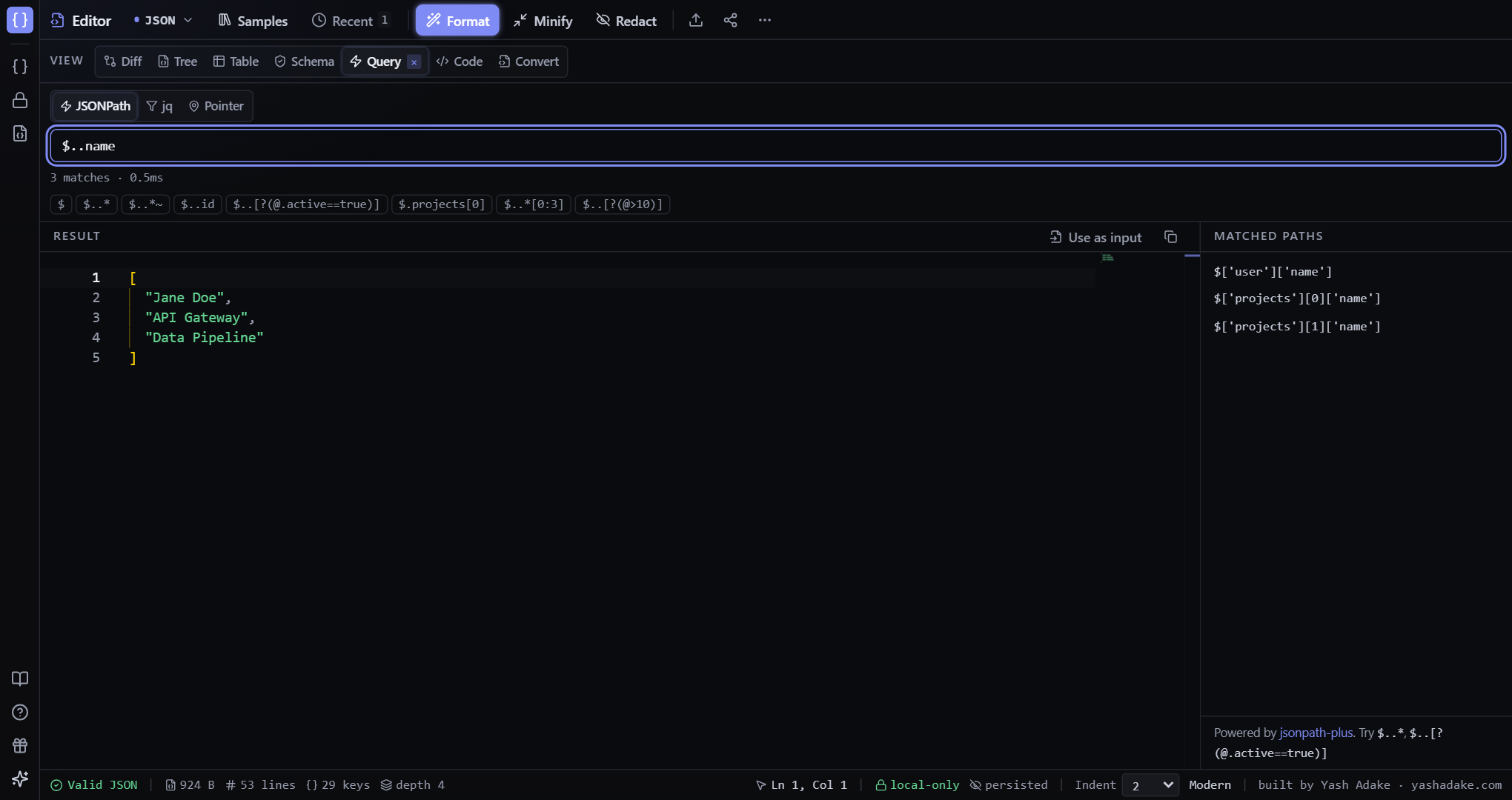
The RESULT panel, the MATCHED PATHS panel, and 'Use as input'
RESULT (centre) is read-only — it's the computed output of your query. You don't type there; change the query or your source JSON instead. MATCHED PATHS (right side) is a JSONPath-only feature: for each value JSONPath matched, it shows the exact location in your document — e.g. $['user']['name'], $['projects'][0]['name']. It answers 'where did this value come from?'. (jq transforms data rather than locating it, so this panel stays empty on the jq tab — that's expected, not a bug.) Above the result, 'Use as input' replaces your editor document with the current result so you can chain another query on it (Ctrl+Z to undo); the copy icon copies the result.
JSONPath
Recursive descent (`$..name` = every 'name' anywhere), filters (`$..[?(@.active==true)]`), array slices (`$..skills[0:3]`), property-name selection (`$..*~` = key names), and wildcards (`$..*`). Each run reports the match count, timing, and the matched paths on the right.
jq (the real jq 1.8, in WebAssembly)
The canonical jq compiled to WebAssembly — the whole language, not a subset: pipes (`|`), `select`, `map`, `group_by`, `keys`, `length`, object construction `{a, b}`, string interpolation, `reduce`, and more. Toggle the 'raw' checkbox for `--raw-output` (emit strings without quotes). It loads only when you open the jq tab, and big inputs run in a background Web Worker so typing stays smooth.
![jq query .projects[] | {id, name} returning two reshaped objects](/docs/query-jq.png)
JSON Pointer (RFC 6901)
Strict, single-value addressing. `/user/name` is one node; `/projects/0` is the first project; `/a~1b` references the key `a/b` (slash is escaped as `~1`, and `~` itself as `~0`); the empty string is the whole document. Always resolves to zero or one node.
Snippets
Each language has a row of grey chips below the box with ready-made patterns tuned to the loaded sample. Click one to drop it into the query — a fast way to learn the syntax by seeing real results.
Examples
Get one field's value (JSONPath)
You just want the user's name out of the sample document.
- Click VIEW → Query, then the JSONPath tab.
- Type `$.user.name` (or `$..name` to find every 'name' in the document).
- RESULT shows `"Jane Doe"`; with `$..name` you also get the two project names, and MATCHED PATHS lists where each came from.
{
  "user": { "name": "Jane Doe" },
  "projects": [
    { "name": "API Gateway" },
    { "name": "Data Pipeline" }
  ]
}[
"Jane Doe",
"API Gateway",
"Data Pipeline"
]Reshape each item (jq)
You have an array of fat objects and want just id + name from each.
- Click the jq tab.
- Type `.projects[] | {id, name}` (or click the matching chip).
- RESULT shows two slimmed objects and the status reads '2 outputs'.
{ "projects": [
  { "id": "api-gateway",  "name": "API Gateway",  "status": "active" },
  { "id": "data-pipeline","name": "Data Pipeline","status": "draft"  }
] }{ "id": "api-gateway", "name": "API Gateway" }
{ "id": "data-pipeline", "name": "Data Pipeline" }Filter, then chain (jq + Use as input)
Keep only active projects, then keep transforming that result.
- On the jq tab, type `.projects[] | select(.status == "active")`.
- RESULT shows just the API Gateway project.
- Click 'Use as input' above the result — your editor document becomes that filtered result.
- Run another jq expression on it (e.g. `.name`). Ctrl+Z in the editor restores the original document.
Address exactly one node (JSON Pointer)
An OpenAPI doc uses `$ref` pointers and you want to resolve one.
- Click the Pointer tab.
- Enter `/components/schemas/User` (or, in the sample, `/user/name`).
- RESULT shows that single node — or nothing if the path doesn't exist.